
This page describes the network connection for a control panel. It has one checkbox, a port and a password, and you also need to know when a change takes effect.
Switching it on
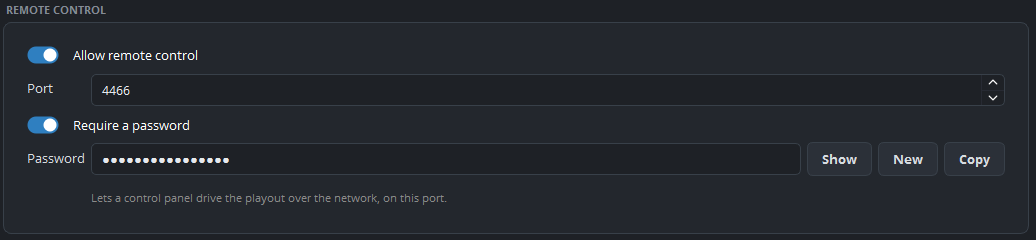
The settings are under Settings → General → Remote control:
| Setting | Description |
|---|---|
| Allow remote control | Off by default. |
| Port | The port that panels connect to. |
| Require a password | Strongly recommended. See below. |
| Password | With the buttons Show, New and Copy. |
New creates a password without characters that are easy to confuse, so it contains no I, l, 0 or O. Copy copies the password to the clipboard, so that you can paste it into the panel.
A change takes effect after a restart
A change to these settings takes effect the next time the program starts. The settings window shows this in orange below the settings: Changed. This takes effect the next time Ultimate Playout starts. So change the settings, restart the program, and then set up your panel.
Security
Switch the password on. Without a password, anyone who can reach the port can stop your broadcast, and on the network of a church or a school this is a large group of people.
Two more recommendations:
Do not forward the port to the internet. A control panel must be on the same network as the program. If someone needs access from another location, use a VPN and not port forwarding.
Change the password when the team of volunteers changes, because by then the password has been written down in several places.
Checking that it works
After the restart, connect your panel. If the panel does not connect, check these points in order:
- Is Allow remote control on, and did you restart the program after you switched it on?
- Is the port the same on both sides?
- Is the password the same? Use Copy, and do not type it.
- Can the panel reach the computer? They must be on the same network, without a firewall between them.
If all four points are correct and the panel still does not connect, a setting was almost always changed while the program was running, and such a change takes effect only at the next start.