
This page describes how to send a playout through a Blackmagic DeckLink card. Most control rooms use this output, because it provides a real SDI signal. It can also send the alpha channel, for graphics that are keyed later in the chain.
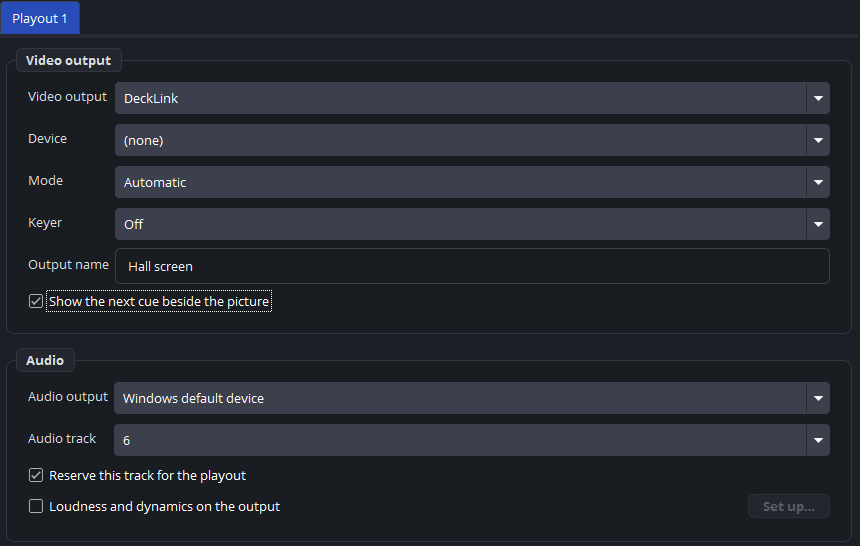
The settings
These settings are under Settings → Outputs, when the type is DeckLink. The last two rows are in the Audio group below:
| Setting | Description |
|---|---|
| Device | The card and the port. |
| Mode | The video mode: the resolution and the frame rate. |
| Keyer | Off, external or internal. See below. |
| Output name | The name in the log, in the status bar and on a control panel. |
| Audio track | Which of the six tracks this card carries. |
| Reserve this track for the playout | Removes all other sources from that track. |
The mode must match the canvas
A DeckLink output starts only when its mode has the same frame rate as the canvas. If the canvas is set to 50 and the card to 59.94, the output does not start.
When you change the frame rate of the canvas, the program warns you and lists the outputs to check. So if an output continues to show failed to start after such a change, check the mode first. See canvas and frame rate.
The audio track
The card carries one track. The program places the playout on that track automatically, and the setting determines which track it is.
Reserve this track for the playout needs some explanation. Without it, the SDI signal can also carry sound from other sources on the computer. With it, the program removes those sources from the track, so the card carries only the playout.
On a computer that is used only for playout, leave it on. If other audio must also reach the card, switch it off, and then check carefully that no unwanted sound is sent out. Part 7 explains tracks in detail.
The keyer
| Option | What the card does |
|---|---|
| Off | No alpha channel. The card sends the picture unchanged. |
| External (fill + key) | The card sends the fill on this port and the key (alpha) on the paired port. A mixer combines the two. |
| Internal (over the input) | The card keys the picture over its own SDI input and sends the result. |
External is the usual choice for graphics that a vision mixer places over its own picture, such as a PNG with transparency, a scene, or a web page with a transparent background.
Use internal when the card itself receives the background. The card then places the playout over its input and sends one finished signal.
Two outputs on one card
A card with several ports can carry several playouts, one on each port.
Two outputs on the same port cannot both start. In that case the status block shows that the device is probably in use, and that is almost always the cause.
Practical notes
Give the card time. After the computer starts, the driver may not be ready when the program is. The program tries again, so an output that shows nothing at first often starts by itself.
The program checks the card. An output can start without an error while the card sends nothing: the driver accepts the picture, but no signal reaches the cable. From version 1.1.7, the program therefore checks every second whether the card is playing out. If the card does not play out for three seconds, the program restarts the output, first after 3 seconds and then with longer pauses. While the card does not play out, the status bar shows 0 fps, whatever the program sends to it.
After three restarts, a window shows the message The DeckLink card is not playing out. The program continues to try, but at this point you usually need to restart Desktop Video or the computer to get the picture back.
DeckLink is not in the list. If DeckLink is missing from Video output, the program found no card. In that case, install the Desktop Video drivers.