
This page covers sending a playout out over a Blackmagic DeckLink card. It is the output a control room usually wants: a real SDI signal, with the alpha channel alongside it if the graphics have to be keyed further down the chain.
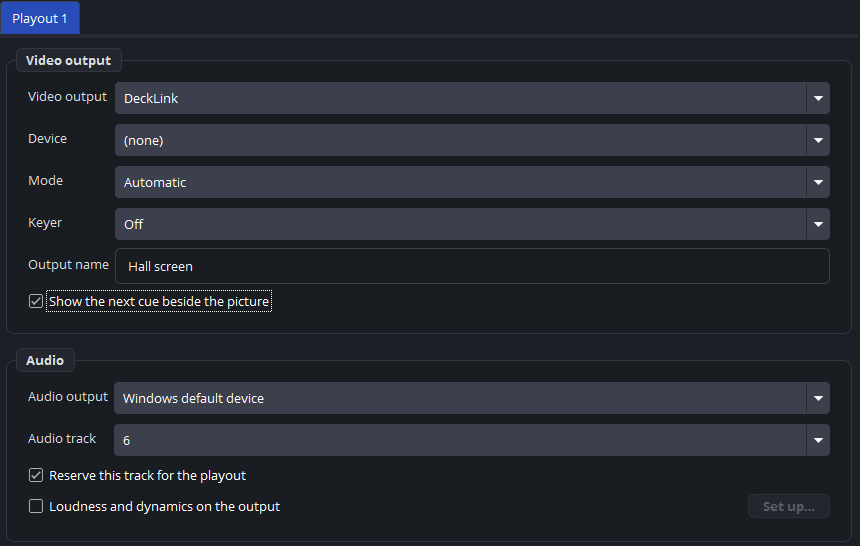
The settings
Settings → Outputs, with the kind set to DeckLink. The last two rows are in the Audio group underneath:
| Setting | What it is |
|---|---|
| Device | Which card and which port. |
| Mode | The video mode: resolution and frame rate. |
| Keyer | Off, external or internal — see below. |
| Output name | The name in the log, the status bar and on a control panel. |
| Audio track | Which of the six tracks this card carries. |
| Reserve this track for the playout | Takes every other source off that track. |
The mode has to match the canvas
A DeckLink output only starts when its mode runs at the same frame rate as the canvas. Set the canvas to 50 and the card to 59.94 and the output simply does not come up.
The program warns you when you change the canvas frame rate and names the outputs whose mode you should check. If an output stays at failed to start after such a change, this is the first thing to look at.
The audio track
The card carries one track. The playout is put on it automatically, and the setting decides which one.
Reserve this track for the playout is worth understanding: without it, the SDI feed can also carry sound from other sources on the machine. Switched on, those are taken off that track and the card carries the playout alone.
On a machine that does nothing but playout, leave it on. On a machine where somebody else’s audio also has to reach the card, that is exactly the setting you would need to leave off — and then to be careful about.
The keyer
| Choice | What the card does |
|---|---|
| Off | No alpha. The picture goes out as it is. |
| External (fill + key) | Fill on this port, key (alpha) on the paired port of the card. That pair goes into a mixer that combines them. |
| Internal (over the input) | The card keys the picture over its own SDI input, and sends the result. |
External is the usual arrangement for graphics a vision mixer lays over its own picture: a PNG with transparency, a scene, a web page with a transparent background.
Internal is for the case where the card itself has the background: the input is keyed under the playout and one finished signal leaves the port.
Two outputs on one card
A card with several ports can carry several playouts, one per port.
Two outputs on the same port cannot both start. The status block says the device is probably already in use, which is nearly always exactly what has happened.
Practical notes
Give the card a moment. After a cold start the driver may not be ready when the program is; the program retries, so an output that is dark at first often comes up by itself.
No DeckLink to choose? If DeckLink is missing from Video output, no card was found — install the Desktop Video drivers.