
Ultimate Playout is a playout program that works from a list. You prepare the complete service or programme in advance as a list of items, and during the broadcast you press GO to play them one by one. This page explains how that differs from the streaming software you may already know, and follows a show from preparation to broadcast.
Why a list works better
Most streaming software is designed for live switching. You click scenes while the broadcast is running, so the operator has to remember the whole show. That works for a simple programme, but it becomes difficult when twenty items follow one another and one volunteer operates the desk.
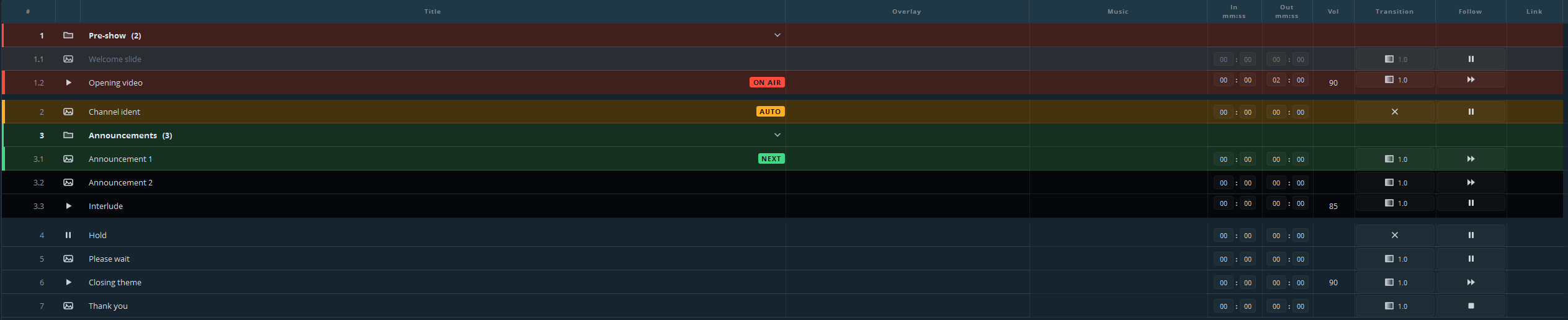
Ultimate Playout works the other way round. Before the broadcast, you build a cue list in which each line is one item that goes on screen. Each line has its own start and end point, volume and transition, and its own instruction for what happens when it ends. During the broadcast, the list shows what is on air (red), what is armed and ready (green), and what follows, and you run the whole show with one button.
The difficult work therefore happens at a moment when mistakes do no harm. You find a missing file, a clip that is four seconds too long or a wrong transition while you build the list, and not in front of three hundred viewers.
What a show looks like
A show always follows the same five steps:
- Prepare. Drag your videos, sound files and stills into the list. Put them in order, trim what is too long, and set what follows what.
- Save. The list is a file, so next week you can open it, replace three items and be ready again.
- Arm. The first cue turns green. Nothing is on air yet.
- GO. The green cue goes on air and turns red, and the next cue turns green by itself.
- Repeat. Cues that must follow one another do so automatically, so you only act where the list waits for you.
While the show runs, the colours in the list show you where you are:
What you do not see
The window shows only the playout: the pictures, the cue list and the program’s own menus, with your own name, logo and icon, also in the Windows taskbar. The scene list, the mixer and the menus of the engine underneath are hidden, so the operator cannot end up in a screen that has nothing to do with the show.
What it is built from
Ultimate Playout consists of a base program and modules. The base program provides the cue list, videos, stills, scenes, web pages, playouts, outputs, streaming, recording, audio and remote control. Modules add further subjects, such as songs, name plates and presentations, and each module has its own part of this manual.
A module that is not installed does not appear in the window. It leaves no greyed-out button or unusable menu item behind. So if your window lacks a button that a module’s part of the manual describes, the module is not installed or not switched on. You can check this under Modules → Manage modules….