
This page explains what kind of program this is and how working with it differs from the streaming software you may know. It describes the way a show runs from start to finish, so that the terms on the following pages have somewhere to land. No settings are changed here — nothing on this page asks you to click anything.
In one sentence
Ultimate Playout is a rundown-driven playout program: you prepare the entire service or programme in advance as a list, and during the broadcast you press GO.
Why that is different
Classic streaming software lets you switch live. You click scenes while it is running, and the operator is the one holding the whole show in their head. That works right up to the moment twenty items have to follow one another and you have one volunteer behind the desk.
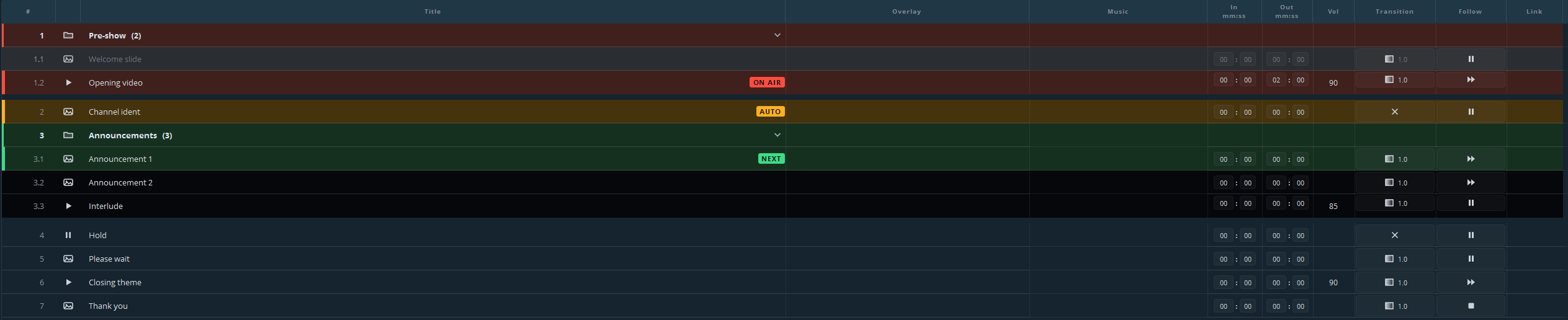
Ultimate Playout turns that around. Beforehand you build a cue list: every line is one thing that goes on screen, with its own start and end point, volume, transition, and instructions for what should happen next. During the broadcast you see what is on air (red), what is armed and ready (green), and what comes after that. Operating it is one button.
The consequence is that the difficult work moves to a moment when nothing is at stake. A missing file, a clip that runs four seconds too long, a transition that is wrong — you find it while building the list, not while three hundred people are watching.
What a show looks like
- Prepare. Drag your video, audio and stills into the list, put them in order, trim what is too long, and set what should follow what.
- Save. The list is a file. Next week you open it, replace three items and you are ready again.
- Arm. The first cue turns green. Nothing is on air yet.
- GO. The green cue goes to air and turns red. The next one turns green by itself.
- Repeat. Where cues have to follow one another automatically, they do — you only step in where the list says a person decides.
The whole state of the show is in the colours, and you read it in one glance:
What you do not see
There is no scene list, no mixer, no menu bar — only the playout interface, under your own name, logo and icon, right down to the Windows taskbar. The person behind the desk cannot end up in a screen that has nothing to do with the show.
What it is built out of
Ultimate Playout consists of a base program and modules. The base program is the cue list, media, stills, scenes, web pages, playouts, outputs, streaming, recording, audio and remote control.
Modules add subjects on top of that — songs, lower thirds, subtitles, presentation import, video services, switcher control. Each module has its own part of this manual.
What is not installed does not exist. A module that is switched off leaves no greyed-out button behind and no menu entry pointing at something you cannot use. If a button described in a module’s part is missing from your copy, that module is not installed or not switched on — check Settings → Modules.
Where to go next
Key concepts — the three words the rest of this documentation leans on.