
This page is the mechanism of the whole program in one page. Three states, two buttons, and the rules about what moves when. If you only read one page of this part, read this one — everything else assumes it.
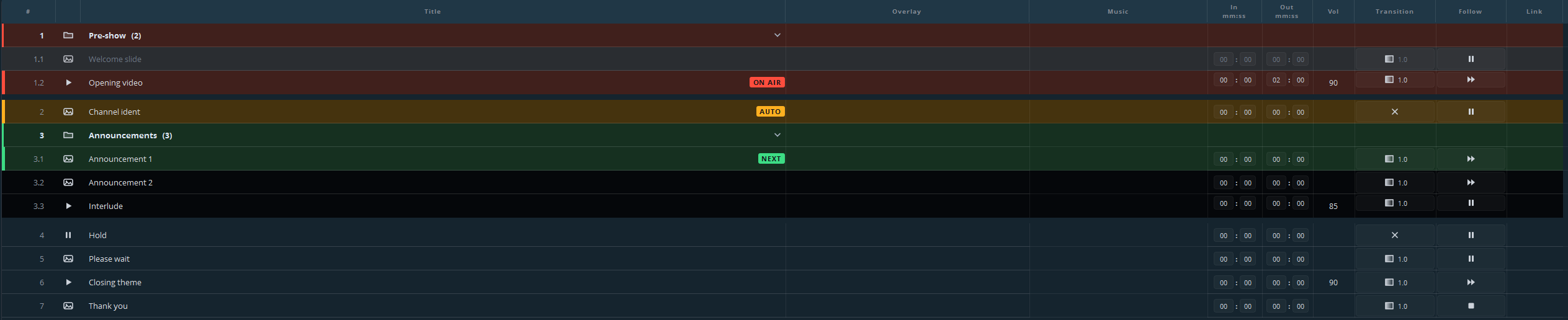
The three states
| State | Colour and badge | Means |
|---|---|---|
| On air | Red, ON AIR | This cue is being broadcast right now. |
| Armed | Green, NEXT | This is what the next GO will fire. |
| Automatic | Amber, AUTO | This will start by itself when the cue on air runs out. |
A cue that has already played goes grey. Everything else keeps the list colour.
Arming
Arming costs nothing and shows nothing. It only decides what GO will do next.
- Click a line — it turns green.
- Arrow keys — move the green marker up and down without touching the mouse.
The green marker moves; the red line does not. You can walk the whole list during a broadcast to check what is coming, and the picture on air never flinches.
After a GO the next line arms itself, so a straightforward show is: GO, GO, GO, without ever arming anything by hand.
GO
Three ways, all identical: the GO button on that playout’s panel, the space bar, or Enter.
GO takes the armed cue to air. The cue turns red, the transition you set for it runs, and the following line arms itself.
GO applies to the active playout — the one whose panel you last clicked. On a desk with two playouts, glance at which panel is highlighted before you use the keyboard.
GO skips what does not take part: anything in the archive is passed over, and a go-to cue is followed rather than played.
Stop
STOP on the panel, or the Esc key. The playout goes to black and the cue ends.
Stop is not pause. Stop ends what was playing; pause holds the picture where it is and lets you continue. If you need a moment to sort something out, pause — a frozen picture is almost always better on air than black.
A stop uses the exit fade you set under Settings → Cue list, so the picture leaves the way you chose rather than snapping away.
What GO does not do
- It does not touch another playout, unless the cue carries a link.
- It does not skip ahead when you are behind; the list plays what is armed.
- It does not undo. There is no “back one cue” — arm the previous line and fire it again, which is the same thing and visible while you do it.