The Linked folder module turns a folder on disk into a part of the cue list. The part shows what is in the folder, in the order of the names, and it changes as soon as the folder changes. You can then build a running order by placing files in that folder, and so can a colleague on the network or another program.
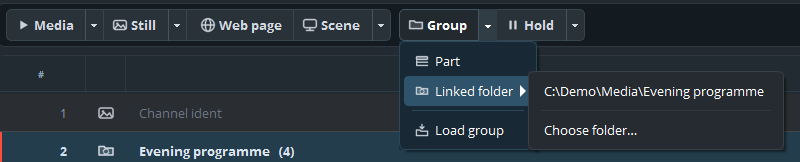
Linked folder in the Group menu, with a folder and Choose folder… under the arrow
What it adds
Linked folder in the Group menu
Adds a folder to the list as a part. The arrow shows the folders that you set or used before, and Choose folder…
A part that follows a folder
Files become cues, and subfolders become groups and subgroups
_settings.playoutfolder
A small file in each folder with the settings of the group that the folder becomes
A folder for each playout
Under Modules → Linked folder…. That folder appears at the top of the menu