
This page covers the bundle: a rundown or a group with every file it uses packed inside it. It is what you send when the material has to travel, and the answer to almost every “it played here but not there”.
Making one
| What you want | How |
|---|---|
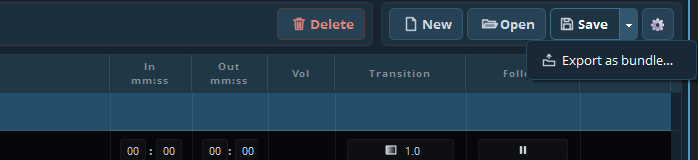
| The whole list | The arrow beside Save → Export as bundle… |
| One group | Right-click the group header → Export group as bundle… |
| A selection | Select more than one line, right-click → Export selection as bundle… (n) |
You get a single .playoutbundle file in
DocumentsUltimate PlayoutExports.
Opening one
Drag it onto the cue list, or use the arrow beside Group in the toolbar → Load group. The media is unpacked and the cues point at the unpacked copies, so it plays immediately on a machine that has never seen your server.
What it costs
Size. A bundle is as large as the media in it. A service with two video clips is a few hundred megabytes; a photo playlist of eighty pictures is more than people expect in an email.
Copies. The media is duplicated. Import the same bundle on five machines and you have five copies. Within one building that is waste; between buildings it is the point.
When to use which
| Situation | Use |
|---|---|
| Another location, another organisation | Bundle |
| A machine not on your network | Bundle |
| Archiving a show exactly as it was broadcast | Bundle |
| Everyday work in your own building | A list or a group file |
| Two machines on the same server | A list — one copy of the media, no drift |
Practical notes
A bundle is the best archive you can make. A list plus a folder of media drifts apart over a year; a bundle is one file that still plays.
Check the size before sending. Most mail systems stop at 25 MB; a bundle usually goes over a file-transfer service or a shared drive.
Unpacking takes a moment, proportional to what is in it. Import the day before, not five minutes before the service.
A bundle carries media and the scenes its cues use. A scene that already exists on the other machine is left as it is, and you get a list of those. Settings stay with the machine.